Bohemia Interactive PAA PAC: Difference between revisions
Jump to navigation
Jump to search
imported>Ikskoks (→Games) |
imported>Ikskoks (→Games) |
||
| (29 intermediate revisions by the same user not shown) | |||
| Line 4: | Line 4: | ||
* ''' Format Type ''': Image <br> | * ''' Format Type ''': Image <br> | ||
* ''' [http://en.wikipedia.org/wiki/Endianness Endian Order] ''': Little Endian <br> | * ''' [http://en.wikipedia.org/wiki/Endianness Endian Order] ''': Little Endian <br> | ||
* ''' Signatures ''': GGATCGVA / GGATCXAM / GGATSFFO <br> | * ''' Signatures ''': GGATCGVA / GGATCXAM / GGATSFFO / GGAT<br> | ||
| Line 11: | Line 11: | ||
<div class="toccolours mw-collapsible" id="mw-customcollapsible-myDivision" style="width:800px; overflow:auto;"> | <div class="toccolours mw-collapsible" id="mw-customcollapsible-myDivision" style="width:800px; overflow:auto;"> | ||
<pre> | <pre> | ||
// | // PAA / PAC file format | ||
// | // Based on https://community.bistudio.com/wiki/PAA_File_Format | ||
// IMAGE HEADER | // IMAGE HEADER | ||
| Line 19: | Line 19: | ||
// TAGS | // TAGS | ||
// for each tag | // for each tag | ||
4 - Tag Header | 4 - Tag Header // "GGAT" | ||
4 - Tag Type String | 4 - Tag Type String // e.g. "CGVA" | ||
4 - Length of Tag Data | 4 - Length of Tag Data | ||
X - Tag Data | X - Tag Data | ||
| Line 61: | Line 61: | ||
** PROCTAGG / GGATCORP (PROC / CORP) - non ASCII string | ** PROCTAGG / GGATCORP (PROC / CORP) - non ASCII string | ||
** OFFSTAGG / GGATSFFO (OFFS / SFFO) - mipmap offset list | ** OFFSTAGG / GGATSFFO (OFFS / SFFO) - mipmap offset list | ||
* Image data can be compressed with '''RLE''', '''LZO''' or '''LZSS'''. | |||
=== Games === | === Games === | ||
| Line 66: | Line 67: | ||
* Argo | * Argo | ||
* Arma 1 | * Arma 1 | ||
* Arma: Armed Assault | |||
* Arma 2 | * Arma 2 | ||
* Arma 2: Operation Arrowhead (*.PAA / *.PAC) | * Arma 2: Operation Arrowhead (*.PAA / *.PAC) | ||
* Arma 3 | * Arma 3 | ||
* Operation Flashpoint | |||
=== QuickBMS Script === | === QuickBMS Script === | ||
| Line 80: | Line 83: | ||
** '''Texture Merger''' (texMerge) from BI Tools - it can merge PAC/PAA/TGA files and save them as TexMerger files (PTM files) | ** '''Texture Merger''' (texMerge) from BI Tools - it can merge PAC/PAA/TGA files and save them as TexMerger files (PTM files) | ||
** '''Pal2PacE''' from BI Tools - command line tool for texture conversion (more info [https://community.bistudio.com/wiki/Pal2PacE here]). It can convert '''JPG/PNG/TGA to PAA/PAC''' and '''PAA/PAC to JGP/PNG/TGA''' files. | ** '''Pal2PacE''' from BI Tools - command line tool for texture conversion (more info [https://community.bistudio.com/wiki/Pal2PacE here]). It can convert '''JPG/PNG/TGA to PAA/PAC''' and '''PAA/PAC to JGP/PNG/TGA''' files. | ||
** '''Oxygen 2''' from BI Tools - model editing tool with support for processing PAC/PAA textures | |||
* [https://community.bistudio.com/wiki/DePac DePac] | * [https://community.bistudio.com/wiki/DePac DePac] | ||
* [https://community.bistudio.com/wiki/ImageToPAA ImageToPAA (from Arma 3 tools)] | * [https://community.bistudio.com/wiki/ImageToPAA ImageToPAA (from Arma 3 tools)] | ||
| Line 92: | Line 96: | ||
* [https://community.bistudio.com/wiki/Pal2PacE Pal2PacE (community.bistudio.com)] | * [https://community.bistudio.com/wiki/Pal2PacE Pal2PacE (community.bistudio.com)] | ||
* [https://community.bistudio.com/wiki/PAA_File_Format PAA file format (community.bistudio.com)] | |||
* [https://pmc.editing.wiki/doku.php?id=arma:file_formats:paa PAA file format (pmc.editing.wiki)] | |||
<br/><br> | <br/><br> | ||
[[Category:Complete | [[Category:Complete Complete|Bohemia Interactive PAA PAC]] | ||
[[Category:Platform PC|Bohemia Interactive PAA PAC]] | [[Category:Platform PC|Bohemia Interactive PAA PAC]] | ||
[[Category:CE Compressed|Bohemia Interactive PAA PAC]] | [[Category:CE Compressed|Bohemia Interactive PAA PAC]] | ||
| Line 102: | Line 108: | ||
[[Category:Extension_paa | Extension: paa]] | [[Category:Extension_paa | Extension: paa]] | ||
[[Category:BMS_None | BMS: None]] | [[Category:BMS_None | BMS: None]] | ||
[[Category:RLE compression]] | |||
[[Category:LZO compression]] | |||
[[Category:LZSS compression]] | |||
[[Category:File Format]] | [[Category:File Format]] | ||
Latest revision as of 22:30, 7 July 2022
Back to index | Edit this page
PAA, PAC
- Format Type : Image
- Endian Order : Little Endian
- Signatures : GGATCGVA / GGATCXAM / GGATSFFO / GGAT
Format Specifications
// PAA / PAC file format
// Based on https://community.bistudio.com/wiki/PAA_File_Format

// IMAGE HEADER
  2 - Image Format (65281=DXT1, 65282=DXT2, 65283=DXT3, 65284=DXT4, 65285=DXT5, 17476=RGBA4444, 5461=RGBA5551, 34952=RGBA8888, 32896=Gray with Alpha)

// TAGS
  // for each tag
    4 - Tag Header // "GGAT"
    4 - Tag Type String  // e.g. "CGVA"
    4 - Length of Tag Data
    X - Tag Data

// PALETTE
  2 - Number of Colors

  // for each color
    1 - Blue
    1 - Green
    1 - Red

// MIPMAPS
  // for each mipmap
    2 - Width
    2 - Height
    3 - Image Data Length
    X - Image Data

    if (ImageFormat == DXT# && width&32768 == 32768){
      // image data is LZO Compressed
      }
    else if (ImageFormat != DXT#){
      // image data is LZSS Compresed
      }
    else {
      // raw image data
      }
Notes and Comments
- This file format occurs in games from Bohemia Interactive.
- This file format supports several tag types:
- AVGCTAGG / GGATCGVA (AVGC / CGVA) - average colour
- MAXCTAGG / GGATCXAM (MAXC / CXAM) - color of brightest pixel in texture?
- FLAGTAGG / GGATGALF (FLAG / GALF) - marks if texture contains transparency
- SWIZTAGG / GGATZIWS (SWIZ / ZIWS) - optional swizzling description
- PROCTAGG / GGATCORP (PROC / CORP) - non ASCII string
- OFFSTAGG / GGATSFFO (OFFS / SFFO) - mipmap offset list
- Image data can be compressed with RLE, LZO or LZSS.
Games
List of games using this file format:
- Argo
- Arma 1
- Arma: Armed Assault
- Arma 2
- Arma 2: Operation Arrowhead (*.PAA / *.PAC)
- Arma 3
- Operation Flashpoint
QuickBMS Script
Not written yet.
Compatible Programs
- BI Tools
- Texture Viewer (TexView2) from BI Tools - it can convert and view PAC/PAA files
- Texture Merger (texMerge) from BI Tools - it can merge PAC/PAA/TGA files and save them as TexMerger files (PTM files)
- Pal2PacE from BI Tools - command line tool for texture conversion (more info here). It can convert JPG/PNG/TGA to PAA/PAC and PAA/PAC to JGP/PNG/TGA files.
- Oxygen 2 from BI Tools - model editing tool with support for processing PAC/PAA textures
- DePac
- ImageToPAA (from Arma 3 tools)
Gallery
-
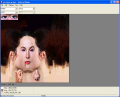
Texture Viewer (from BI Tools)
-
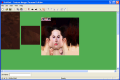
Texture Merger (from BI Tools)


See Also
- Pal2PacE (community.bistudio.com)
- PAA file format (community.bistudio.com)
- PAA file format (pmc.editing.wiki)