HCA Audio: Difference between revisions
Jump to navigation
Jump to search
imported>Ikskoks |
imported>Ikskoks (→Games) |
||
| (46 intermediate revisions by the same user not shown) | |||
| Line 4: | Line 4: | ||
* ''' Format Type ''': Audio <br> | * ''' Format Type ''': Audio <br> | ||
* ''' [http://en.wikipedia.org/wiki/Endianness Endian Order] ''': Big Endian <br> | * ''' [http://en.wikipedia.org/wiki/Endianness Endian Order] ''': Big Endian <br> | ||
* ''' Signature ''': HCA <br> | * ''' Signature ''': HCA (not encrypted) / C8 C3 C1 00 (encrypted) <br> | ||
=== Format Specifications === | === Format Specifications === | ||
<div class="toccolours mw-collapsible" id="mw-customcollapsible-myDivision" style="width: | <div class="toccolours mw-collapsible" id="mw-customcollapsible-myDivision" style="width:900px; overflow:auto;"> | ||
<pre> | <pre> | ||
// HCA file format | // HCA file format | ||
| Line 16: | Line 16: | ||
// header | // header | ||
4 bytes (char) - signature // "HCA\x00" | 4 bytes (char) - signature // "HCA\x00" - not encrypted | ||
2 bytes (uint16) - version // 0x01 0x03 | // C8 C3 C1 00 - encrypted 0x00C1C3C8 & 0x7f7f7f7f = "HCA\x00" | ||
2 bytes (uint16) - version // 0x01 0x03 - v1.3 | |||
// 0x02 0x00 - v2.0 | |||
// 0x03 0x00 - v3.0 | |||
2 bytes (uint16) - header size | 2 bytes (uint16) - header size | ||
| Line 43: | Line 46: | ||
=== Notes and Comments === | === Notes and Comments === | ||
* HCA files may be encrypted with '''XOR'''. | * HCA files may be encrypted with '''XOR''' using 8-bytes keys. | ||
* HCA audio is often stored inside '''[[AWB Archive]]'''. | |||
=== Games === | === Games === | ||
List of games using this file format: | List of games using this file format: | ||
* Boku wa Tomodachi ga Sukunai Portable (PSP) (*.HCA) | * Boku wa Tomodachi ga Sukunai Portable (PSP) (*.HCA) | ||
* Heaven Burns Red (HCA audio packed inside AWB archive) | |||
* Priconne! Grand Masters (Android) (HCA audio packed inside AWB archive) | |||
* Super Robot Wars T (*.BIN) | * Super Robot Wars T (*.BIN) | ||
And also some games listed [[AWB Archive|here]]. | |||
=== Compatible Programs === | === Compatible Programs === | ||
* foobar2000 + vgmstream plugin ( | * [https://github.com/kohos/CriTools CriTools] | ||
* foobar2000 + vgmstream plugin (supports encrypted files) | |||
* [https://github.com/KinoMyu/FastHCADecoder FastHCADecoder] | |||
* Media Player Classic | * Media Player Classic | ||
* [https://github.com/OpenCGSS/DereTore/wiki/HCA-Cipher-Converter HCA-Cipher-Converter] / [https://github.com/OpenCGSS/DereTore/wiki/HCA-Decoder HCA-Decoder] / [https://github.com/OpenCGSS/DereTore/wiki/HCA-Encoder HCA-Encoder] | * [https://github.com/OpenCGSS/DereTore DereTore] / [https://github.com/OpenCGSS/DereTore/wiki/HCA-Cipher-Converter HCA-Cipher-Converter] / [https://github.com/OpenCGSS/DereTore/wiki/HCA-Decoder HCA-Decoder] / [https://github.com/OpenCGSS/DereTore/wiki/HCA-Encoder HCA-Encoder] | ||
* [https://www81.zippyshare.com/v/Utfq6H9W/file.html HCA Decoder v1.16] | * [https://www81.zippyshare.com/v/Utfq6H9W/file.html HCA Decoder v1.16] | ||
* [https://github.com/Thealexbarney/VGAudio VGAudio] (supports some encrypted files) | |||
=== Applying HCA keys with foobar2000 === | |||
# Create some directory on your desktop, call it for example "'''HCA Audio'''". | |||
# Get your HCA key in hex form, for example 66 15 51 8E 8E CE D4 47. | |||
# Create '''.hcakey''' file and put HCA key inside as hex data (8 bytes long). You can use hex editor for that. | |||
# Put your AWB/ACB files inside a directory with '''.hcakey''' file.<br>Final effect should look like this: <br>[[File:hca_foobar_tutorial_1.png]] | |||
# Play AWB file in foobar2000 with vgmstream plugin installed. | |||
=== See Also === | === See Also === | ||
| Line 61: | Line 79: | ||
* [[USM Video|USM Video file format]] | * [[USM Video|USM Video file format]] | ||
* [https://hcs64.com/mboard/forum.php?showthread=22828&showpage=0 Decoding HCA CRI files] | * [https://hcs64.com/mboard/forum.php?showthread=22828&showpage=0 Decoding HCA CRI files] | ||
* [https://blog.mottomo.moe/categories/Tech/RE/en/2018-10-12-New-HCA-Encryption/ The "New" Encryption of HCA Audio ] | |||
* [https://github.com/vgmstream/vgmstream/blob/master/src/meta/hca_keys.h hca_keys.h] | * [https://github.com/vgmstream/vgmstream/blob/master/src/meta/hca_keys.h hca_keys.h] | ||
<br/><br> | <br/><br> | ||
Latest revision as of 20:55, 17 April 2022
Back to index | Edit this page
HCA
- Format Type : Audio
- Endian Order : Big Endian
- Signature : HCA (not encrypted) / C8 C3 C1 00 (encrypted)
Format Specifications
// HCA file format

// big endian

// header
4 bytes (char) - signature // "HCA\x00" - not encrypted
                           // C8 C3 C1 00 - encrypted      0x00C1C3C8 & 0x7f7f7f7f = "HCA\x00"
2 bytes (uint16) - version   // 0x01 0x03 - v1.3
                             // 0x02 0x00 - v2.0
                             // 0x03 0x00 - v3.0
2 bytes (uint16) - header size

// format info
4 bytes (char) - format string // "fmt\x00"
1 byte (uint8) - channels
3 bytes (uint24) - sample rate
4 bytes (uint32) - frame count
2 bytes (uint16) - encoder delay
2 bytes (uint16) - encoder padding

// compression info (v2.0) or decoder info (v1.X), never both
4 bytes (char) - compression string // "comp"
//TODO

4 bytes (char) - decode string // "dec\x00"
//TODO
MultiEx BMS Script
Not written yet.
Notes and Comments
- HCA files may be encrypted with XOR using 8-bytes keys.
- HCA audio is often stored inside AWB Archive.
Games
List of games using this file format:
- Boku wa Tomodachi ga Sukunai Portable (PSP) (*.HCA)
- Heaven Burns Red (HCA audio packed inside AWB archive)
- Priconne! Grand Masters (Android) (HCA audio packed inside AWB archive)
- Super Robot Wars T (*.BIN)
And also some games listed here.
Compatible Programs
- CriTools
- foobar2000 + vgmstream plugin (supports encrypted files)
- FastHCADecoder
- Media Player Classic
- DereTore / HCA-Cipher-Converter / HCA-Decoder / HCA-Encoder
- HCA Decoder v1.16
- VGAudio (supports some encrypted files)
Applying HCA keys with foobar2000
- Create some directory on your desktop, call it for example "HCA Audio".
- Get your HCA key in hex form, for example 66 15 51 8E 8E CE D4 47.
- Create .hcakey file and put HCA key inside as hex data (8 bytes long). You can use hex editor for that.
- Put your AWB/ACB files inside a directory with .hcakey file.
Final effect should look like this: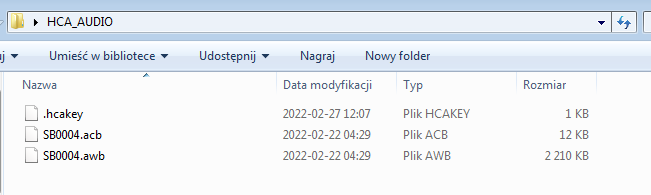
- Play AWB file in foobar2000 with vgmstream plugin installed.

See Also