XACT XWB XSB XGS Audio: Difference between revisions
imported>Ikskoks (→XSB) |
imported>Ikskoks |
||
| Line 99: | Line 99: | ||
: uint32 {4} - Loop region length (not sure what this does) <br> | : uint32 {4} - Loop region length (not sure what this does) <br> | ||
<br> | <br> | ||
=== Notes and Comments === | === Notes and Comments === | ||
Revision as of 22:04, 15 April 2022
General Info
XACT is Microsoft Cross-Platform Audio Creation Tool shared first with Xbox SDK and then with DirectX SDK. It uses XAP file format (XACT project file).
The .xap files are processed at compile-time by the XACT program to xwb, xsb and xgs files:
XWB = XACT Wave Bank - a file format containing a collection of waves. Waves are the raw wave data in wav, aiff or xma format.
XSB = XACT Sound Bank - a collection of sounds and cues.
XGS = XACT General Settings - defines rules and settings for sounds.
The original release of XACT was in 2002 and shipped as part of the Xbox SDK only and was originally called the "Xbox Audio Creation Tool".
Later it was modified to work with Microsoft Windows.
XWB
- Format Type : Archive / Audio
- Endian Order : Little Endian / Big Endian
- Signature : WBND / DNBW
Format Specifications
char {4} - Signature (WBND)
uint32 {4} - Tool Version (e.g. 46)
uint32 {4} - File Format Version (e.g. 44)
uint32 {4} - Size Of Header
uint32 {4} - Offset To Details Directory
uint32 {4} - Length Of Details Directory
uint32 {4} - Offset To Filename Directory
uint32 {4} - Length Of Filename Directory
uint32 {4} - First File Offset (8192)
uint32 {4} - Unknown
uint16 {2} - Unknown (1)
uint16 {2} - Unknown (1)
uint32 {4} - Number Of Files
char {16} - Archive Filename (null) (without extension)
uint32 {4} - Length Of Each Details Entry (24)
uint32 {4} - Length Of Each Filename Entry (64)
uint32 {4} - Max padding size between each file (2048)
uint32 {4} - null
// for each file
- uint16 {2} - Unknown (0/2)
- uint16 {2} - Unknown (1)
- uint32 {4} - Unknown
- uint32 {4} - File Offset [+firstFileOffset]
- uint32 {4} - File Length
- uint64 {8} - null
// for each file
- char {64} - Filename (null) (without extension)
// for each file
- byte {X} - File Data
- byte {0-2047} - null Padding so the file length is a multiple of 2048 bytes)
Format Specifications #2
// ARCHIVE HEADER
- char {4} - Header (WBND)
- uint32 {4} - Version
// DIRECTORIES
// Strictly speaking you can seek past this section, it (always?) refers to 4 directories
- // DIR 1 - WAVE BANK INFO
- uint32 {4} - Offset
- uint32 {4} - Length
- // DIR 2 - FILE RECORDS
- uint32 {4} - Offset
- uint32 {4} - Length
- // DIR 3 - ALWAYS EMPTY?
- uint32 {4} - Offset
- uint32 {4} - Length
- // DIR 4 - FILE DATA
- uint32 {4} - Offset
- uint32 {4} - Length
// DIR 1 - WAVE BANK INFO
- uint32 {4} - Flags
- uint32 {4} - Number of files
- byte {16} - Wavebank name (Padded with 0's)
- uint32 {4} - Size of each file record (in dir 2)
- uint32 {4} - Size of each entry name block
- uint32 {4} - Offset of file data
- uint32 {4} - Always null?
// DIR 2 - FILE RECORDS
- // FOR EACH FILE
- uint16 {2} - Number of channels
- uint16 {2} - Format tag (0=normal pcm) (1=xbox adpcm)
- uint32 {4} - Magic value
- uint32 {4} - File offset (Relative to start of DIR 4)
- uint32 {4} - File size
- uint32 {4} - Loop region offset (not sure what this does)
- uint32 {4} - Loop region length (not sure what this does)
Notes and Comments
XWB files (XACT Wavebanks) contain the audio data and are used in some XBOX and PC games.
XWB files contain 2 types of audio:
- PCM - Standard Wave PCM
- Xbox ADPCM - As used by many Xbox games
The PCM audio can be played easily, to play the Xbox ADPCM however you either need to pass it through a decoder (there's one in Psychonauts Explorer) or install the Xbox ADPCM codec.
The Wavebank doesnt contain any file names. This is because these are stored in a seperate file - the SoundBank file (.xsb). See below for info on this.
XWB audio files may occur along with XNB Archives.
XGS
- Format Type : Misc
- Endian Order : Little Endian
- Signature : XGSF / FSGX
Format Specifications
//header
4 bytes (char) - Signature // "XGSF" or "FSGX"

// TODO
XSB
- Format Type : Misc
- Endian Order : Little Endian
- Signature : SDBK / KBDS
Format Specifications
// ARCHIVE HEADER
- char {4} - Header (SDBK)
- uint32 {4} - ?
- uint32 {4} - Offset of wavebank name (Name is 16 bytes long)
- byte {18} - ?
- uint16 {2} - Number of files (File names)
- byte {28} - Soundbank name?
// FILE RECORDS
- // FOR EACH FILE
- uint32 {4} - Offset of filename
- uint32 {4} - ?
- uint32 {4} - ?
- uint32 {4} - ?
- uint32 {4} - ?
Seek to 'Offset of filename' and read the filename (it is null terminated).
I assume that the order of the filenames in the SoundBank corresponds to the order of the files in the WaveBank, but I dont know for sure. Be aware that sometimes there are more entries in a WaveBank than there are file names in a SoundBank, so some files have no name.
Notes and Comments
XBox Soundbanks contain the file names for the files in their corresponding Wavebank, along with other, unknown data.
The name of the SoundBank corresponds to the WaveBank usually, eg ASMusic.xwb and ASMusic.xsb. If in doubt though, the SoundBank referrs to its WaveBank internally, so you can check.
Some WaveBanks do not have a corresponding SoundBank.
SDK Compatibility Table
XACT program is shared with DirectX SDK since 2006.
Below table represents version compatibility for each SDK version.
Whole list of different SDK executables can be found on web archive.
| SDK Version | XWB Tool Version | XWB File Format Version | Example Games Using This SDK |
|---|---|---|---|
| Xbox SDK (2002-2005) | 1-37 (?) | unknown | Brute Force (Xbox) |
| 2005, April | None | None | None |
| 2005, August | None | None | None |
| 2006, April | 38 | 48 (?) | unknown |
| 2006, June | 39 | 48 (?) | unknown |
| 2006, August | 40 | 48 (?) | unknown |
| 2006, December 2007, February 2007, April |
42 | 42 | unknown |
| 2007, August | 43 | 42 | unknown |
| 2008, March 2008, August |
44 | 42 | Bully: Scholarship Edition v1.2 (PC) Saints Row 2 |
| 2009, March | 45 | 43 | unknown |
| 2009, August 2010, February 2010, June |
46 | 44 | BlazBlue: Chronophantasma Extend (PC) Bleed v1.7.0 (PC) Skulls of the Shogun |
Other Info
quickBMS Script
Not written yet.
Compatible Programs
- EkszBox-ABX
- foobar2000 + vgmstream plugin (+ source code)
- Game Extractor
- MonoGame.Framework
- Psychonauts Explorer
- QuickWaveBank (+ source code)
- towav
- unxwb
- xactxtract
- xact360extract
- XACT (from DirectX SDK) (default location: C:\Program Files (x86)\Microsoft DirectX SDK (<version>)\Utilities\bin\x86\Xact3.exe)
- XNA Game Studio 3.1
- XWB Extractor (by Crypton)
- xwb_split
- XWBTool (+ source code)
Games
These games use this file format
- 007 Goldeneye (X360) (*.XWB / *.XGS / *.XSB)
- Alan Wake (Bonus Disc)
- BlazBlue: Chronophantasma Extend (PC) (*.XWB / *.XSB)
- Bleed (PC) (*.XWB / *.XGS / *.XSB)
- Brute Force (Xbox) (*.XWB / *.XSB) (version 2)
- Bully: Scholarship Edition
- Call of Juarez: Bound in Blood (PS3)
- Call of Juarez: Gunslinger
- Crackdown 1 (X360) (*.XWB)
- Conker: Live & Reloaded (Xbox)
- Darkwatch (XBox) *.xwb
- Drakensang
- Full Spectrum Warrior *.xwb
- Ghost Recon 2 (XBox) *.xwb
- Gray Matter (*.XWB / *.XSB)
- I Maed A Gam3 W1th Z0mb1es 1n It!!!1
- Just Cause (X360) (*.XWB / *.XSB)
- Kung Fu Strike
- Magicka
- Minecraft
- Ms. Splosion Man (X360)
- Perfect Dark Zero (X360) (*.XWB)
- Powerdrome *.xwb
- Psychonauts *.xwb
- Return To Castle Wolfenstein: Tide Of War (XBox) *.xwb
- Saint Row 2
- Skulls of the Shogun
- Star Trek Shattered Universe (XBox) *.xwb
- Sudeki *.xwb
- Terraria
- The Misadventures of P.B. Winterbottom
- Trials HD (Xbox) *.xwb
- Unreal Championship 2 (XBox) *.xwb
- Unreal Championship 2: The Liandri Conflict (XBox) *.xwb
- Worms Reloaded (*.XWB / *.XGS / *.XSB)
- Xblaze Code: Embryo
See Also
- Cross-platform Audio Creation Tool (wikipedia)
- monoxna - XnaFrameworkAudio.wiki
- XACT description (multimedia.cx)
- XACT.pdf
- XNB Archives (xentax wiki)
- XWB file format (PsychonautsExplorer)
Gallery
-
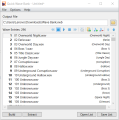
Quick Wave Bank
-
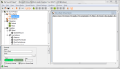
XACT

